Topics
How to Review and Approve Your Videos in Blended Sense Studio
Blended Sense Studio is your central hub for managing your video projects from start to finish. Inside Studio, you can:
This guide walks you through the full review and approval process.
Log in at:
studio.blendedsense.com
You will receive email notifications whenever videos are ready for review. These emails contain direct links to your project.
Once logged in, your Order Page becomes the home base for your project.
Here you can:
Common statuses include:
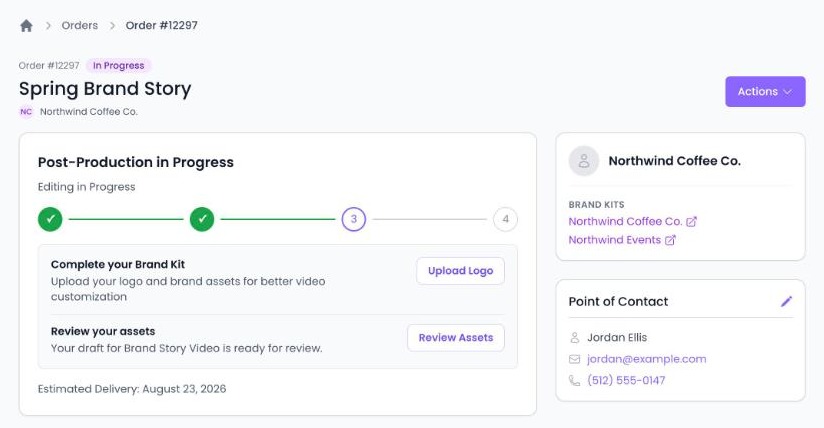
If your project includes branding customization, you may see a prompt to complete your Brand Kit.
You can upload:
Providing these materials helps your editor create videos aligned with your brand identity.
When your editor uploads the first version of your videos, you will receive an email notification.
You will also see a “Review Your Assets” prompt on your Order Page.
Click “Review Assets” to open the interactive video review player.
The Blended Sense review player allows you to review videos directly in your browser without downloading additional software.
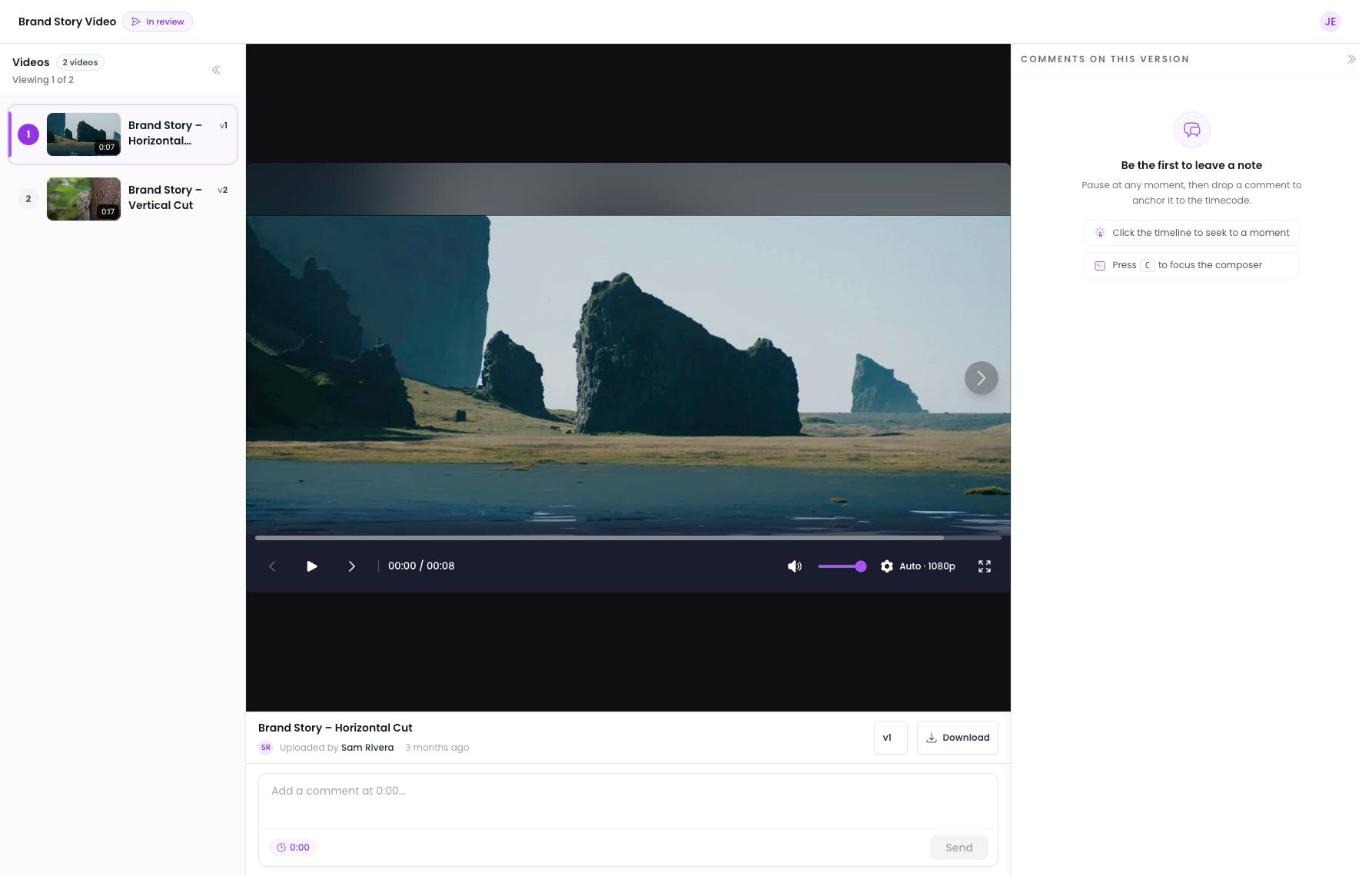
On the left side of the screen, you’ll see a list of all videos included in the review round.
Each video includes:
If multiple videos are included, you can switch between them at any time.
The center section contains the video player.
Available controls include:
You can click anywhere on the timeline to jump to a specific moment in the video.
You can adjust playback quality depending on your internet connection.
Available options may include:
For the most accurate review experience, we recommend using Original or 1080p whenever possible.
You can download review versions directly from the player using the download button in the toolbar.
This is useful for offline review or sharing internally with stakeholders.
On the right side of the player, you’ll find the Comments Panel.
This panel contains:
Comments are tied directly to moments in the video timeline for precision and clarity.
Timestamped feedback helps your editor quickly identify exactly where changes are needed.
To leave a comment:
Your note will automatically attach to that exact timestamp.
Examples of helpful feedback:
The more specific your feedback is, the faster revisions can be completed.
After reviewing the videos and adding comments, you’ll choose one of two actions:
If edits are needed:
Once submitted:
Before you submit your feedback, take a breath and really sit with this edit. Grab a coffee, get comfortable, and watch it more than once. The more thorough and detailed your feedback is now, the faster your final asset lands in your hands.
This round is your best opportunity to get all your revisions in, from every stakeholder, every department, every person who has an opinion. The final round is reserved for last-minute tweaks only, so treat this as the real one.
Loop in anyone who needs to weigh in before you submit. The more specific you are, the better.
If the video is finalized and ready to use:
Once approved:
Approved versions are considered finalized.
After revisions are completed, you will receive another email notification letting you know a new version is ready.
You can return to the review player to:
The system maintains version history so you can easily switch between versions such as v1, v2, and v3.
This helps confirm that requested changes were completed successfully.
Each project includes 2 revision rounds. If feedback extends beyond those rounds or requires changes outside the original project scope, additional revision fees may apply.
To avoid unexpected charges, make sure all feedback is consolidated and submitted within the designated revision rounds.
To help keep projects moving on schedule, Blended Sense uses an automatic approval policy.
If no action is taken within 48 hours of a review round being delivered:
This applies if:
If you need additional review time, please contact your project manager before the 48-hour window closes.
You will receive an email notification whenever a new review round is available. You can also check your Order Page inside Studio at any time.
Yes. You can leave comments freely without formally submitting a revision request.
However, editors are only officially notified to begin revisions after you click “Request Changes.”
Yes. Videos can be downloaded directly from the review player using the download button.
Each deliverable displays a version number such as v1, v2, or v3 in the review player.
Once approved, the deliverable is considered finalized and your team will prepare the final delivery files.
If a deliverable has already been approved and additional edits are needed, contact your Blended Sense project manager. Additional edits may require a new request.
Please contact your Blended Sense project manager directly to discuss next steps.
You can:
We’re happy to help guide you through the process.


